
Blogs

What Is Container Storage and How Does It Work?

Container storage is the quiet foundation behind reliable containerized applications. It preserves data when containers stop, restart, move, or disappear. Without it, a database may look healthy while its records vanish with the next deployment.

The CNCF Annual Survey 2023 reported that 84% of respondents were running containers in production. That figure shows strong adoption, but it also exposes a common weakness: many teams understand container images better than persistent data. CNCF research repeatedly identifies storage, security, and operational complexity as continuing cloud-native concerns. Container storage connects temporary workloads to durable volumes, snapshots, backups, and shared filesystems. It can use local disks, network-attached systems, or cloud services. Each option changes latency, resilience, cost, and recovery time.

Liz Rice, a recognized cloud-native and container security expert, explains the underlying model simply: “A container is just a process.” That process still needs dependable data beneath it. A payment service may require millisecond access, while an archive can tolerate slower storage. The choice is not universal.

This is where teams sometimes misjudge the design. A persistent volume does not automatically create a backup. Replication does not always guarantee recoverability. Even a successful deployment can fail during a regional outage.

A practical container storage strategy maps each workload to its data needs. It defines retention, access modes, encryption, monitoring, and tested recovery procedures. The technology is important. The operating discipline matters more.

What Is Container Storage and How Does It Work?

Define Container Storage: OCI Image Layers, Writable Layers, and Volumes

Container storage is the system that supplies files to a running container. Its structure has three important parts: OCI image layers, a writable layer, and volumes. Understanding their differences helps teams protect data and control storage costs.

An OCI image is built from several read-only layers. Each layer records changes, such as installed packages or application files. During startup, the container engine stacks these layers into one visible filesystem. The running container then receives a thin writable layer above them. New files and edits enter this layer through copy-on-write behavior. The original image remains unchanged. This design saves space because many containers can share the same read-only data.

But the writable layer is temporary. I have seen test containers lose uploaded files after removal, even when the application appeared healthy. That mistake was preventable. The writable layer suits caches, temporary logs, and short-lived processing. It should not hold customer records or important application state.

Volumes provide a separate storage location managed outside the container’s writable layer. They can survive container replacement and support database files, user uploads, and generated reports. In practice, volume performance depends on the underlying disk, access permissions, and backup design. A volume is not automatically a backup. It can still be deleted, corrupted, or mounted incorrectly. Clear ownership settings and regular recovery tests matter more than simply attaching storage. The model is simple, but operational details remain easy to underestimate.

Trace the Storage Lifecycle: From Image Pull to Data Persistence

What Is Container Storage and How Does It Work?

Trace the Storage Lifecycle: From Image Pull to Data Persistence

A container begins with an image pull. The image arrives as several read-only layers, often cached on the node. During startup, the runtime combines these layers with a thin writable layer. Files created inside the container live there. When the container is deleted, they disappear. It is easy to miss this detail.

Persistent storage follows a different path. A volume is mounted into a chosen directory, such as /var/lib/data. The application writes database records, logs, or uploaded files there. The data remains after restarts because it exists outside the container’s temporary layer. In clustered environments, a storage driver provisions remote capacity, attaches it to a node, and mounts it with defined permissions. Snapshots and backups should be tested, not merely scheduled.

The CNCF 2023 Annual Survey reported that 84% of respondents ran containers in production. A 2024 cloud infrastructure survey found that 89% of organizations used multiple cloud environments. These figures explain why storage lifecycle planning matters. Data may move between nodes, zones, or failure domains. Encryption, retention rules, access controls, and reclaim policies must travel with it. The boundary is less clean than diagrams suggest. Operators still confuse image storage with application data, especially during emergency recovery. A practical test is simple: delete the container, recreate it, and verify the records remain.

Compare Ephemeral and Persistent Storage Using Kubernetes’ Four Access Modes

Container storage gives workloads a place to write logs, databases, images, and temporary files. The choice becomes critical when containers restart or move between nodes. CNCF’s 2023 Annual Survey reported that 84% of organizations run containers in production. That scale makes storage behavior an operational concern, not a minor configuration detail.

Ephemeral storage disappears when a container or workload is removed. It suits caches, scratch space, and generated files that can be rebuilt.

Persistent storage survives restarts and rescheduling through a storage volume. It fits databases, user uploads, and audit records.

Kubernetes describes access through four modes: ReadWriteOnce, ReadOnlyMany, ReadWriteMany, and ReadWriteOncePod. ReadWriteOnce allows one node to mount a volume for writing. ReadOnlyMany supports several readers. ReadWriteMany permits multiple nodes to write. ReadWriteOncePod limits writing to one pod across the cluster.

The practical difference appears during failure. A node crashes, and ephemeral files vanish. Persistent data can reattach elsewhere, if the storage system supports that movement. Flexera’s 2024 State of the Cloud Report found that 89% of surveyed organizations use a multicloud strategy. Distributed environments increase the need for clear access rules and recovery testing. Yet access mode alone does not guarantee safety. I have seen teams select ReadWriteMany, then discover application-level conflicts. The setting permits writes; it does not coordinate them. Storage design still needs backups, latency checks, capacity alerts, and careful failure drills. Sometimes the simplest volume is the wrong one.

Explain CSI Provisioning Through Kubernetes StorageClasses and Volume Claims

What Is Container Storage and How Does It Work?

Explain CSI Provisioning Through Kubernetes StorageClasses and Volume Claims

Container storage becomes practical when Kubernetes separates application intent from infrastructure details. A developer creates a PersistentVolumeClaim (PVC), requesting capacity, access mode, and sometimes performance. The PVC is a request, not a disk. A StorageClass supplies the provisioning rules, including the CSI driver, volume type, encryption preference, and reclaim policy.

When a PVC appears, the Kubernetes control plane matches it with an existing PersistentVolume or asks the CSI controller to create one dynamically. The controller sends provisioning instructions to the storage system. After creation, Kubernetes records the resulting PersistentVolume and binds it to the claim. A pod then mounts the claim through the CSI node plugin. In a real cluster, this may look like a small YAML file, but several control-plane events occur before a database writes its first page.

The 2023 Cloud Native Computing Foundation Annual Survey reported that 84% of respondents ran containers in production, increasing pressure for reliable persistent storage.

The Cloud Native Computing Foundation’s 2022 survey also showed Kubernetes production use at 58% among respondents. These figures explain why StorageClasses matter: teams need repeatable provisioning, not manually created volumes.

Operators should inspect reclaimPolicy carefully. Delete can remove storage after a claim disappears; Retain supports recovery but leaves cleanup work. Expansion may also require filesystem support. CSI is powerful, but not effortless. A misnamed class, incorrect topology rule, or untested recovery path can still break an otherwise healthy workload.
Assess Reliability with Replication, Snapshots, and CNCF’s 84% Container Adoption Data

Container storage is the persistent layer behind short-lived containers. It keeps databases, logs, and uploaded files available after a container restarts. CNCF’s 2023 Annual Survey reported that 84% of respondents run containers in production. That adoption rate raises a practical concern: storage failures can affect many services at once.

Replication is the first reliability check. A workload may write identical data to two or three storage locations. If one node fails, another can continue serving requests. However, replication is not a backup. Corrupted data can spread across replicas. The 2024 Global Data Center Survey reported that 53% of organizations experienced an outage during the previous three years. A healthy replica cannot repair every failure.

Snapshots provide recovery points. An operations team might capture a database snapshot before an upgrade, then test restoration on an isolated volume. Recovery speed depends on snapshot size, network capacity, and metadata accuracy. Tests matter more than confident documentation. Many teams discover missing permissions or inconsistent application data during recovery drills. CNCF’s survey data shows widespread container use, but adoption alone does not prove storage maturity. Track recovery time, recovery-point gaps, replica lag, and failed restore tests. Keep at least one recovery copy separate from the production environment. Otherwise, a storage incident may quietly become a recovery incident.

Plug & Play Installation

Our installation services are top-notch, delivering modular systems for any application on time in plug & play condition. We leave nothing for you to figure out, set up, or fix. All you’ve to do is just step in, and get going with your business.

Dismantling & Reassembling

We hold a long-term view when we build modular rooms taking into consideration your changing needs. Whether it’s shifting your workspace to a new site, redesigning your unit to fit new requirements, or simply clearing the area at the end of the project, our Dismantling & Reassembling teams are pressed into service to get the job done in the quickest possible time and minimum resource wastage.

Interior Designing

Our interior designs combine both functional and aesthetic aspects to provide you with physical and emotional comfort. We ask you for your preferences and give the best possible solutions aligned to your tastes. Our units are built to be modern, stylish, and elegant.

Bespoke Solutions

We understand that every project is unique and therefore has a different set of requirements. That’s why we believe in customizing our solutions to fit individual needs. We are equipped with the right talents, technology, and skillset to offer bespoke modular units, without compromising on turnaround time or quality.

Aftersales Service

The benefits of choosing Containers ME continues long after the installation of the units as we provide aftersales service for as long as you need. All you have to do is sign the Annual Maintenance Contract (AMC) and enjoy technical support for all the maintenance-related issues. By signing the contract, you can rest assured that a highly professional team of dedicated staff are at your service all year round to attend to your needs.

Customized Container Solutions

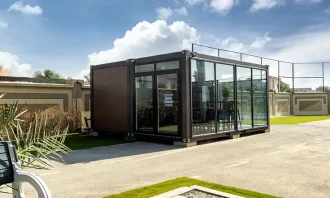
We specialize in Customized Container Solutions designed to meet diverse needs across the UAE. Our offerings include customized modular containers that cater to various applications, from tailor-made container solutions to bespoke container designs.

Whether you’re looking for personalized container homes or custom modular containers, we have you covered. Our customized container offices provide functional workspaces, while our customized portable containers ensure flexibility on-site. Explore our range of custom container storage units and customized cargo containers to optimize your space.

We also offer custom container leasing and custom container fabrication services, along with customized sea containers designed for secure transport. For specialized needs, our specialized container modifications will help you create the perfect solution for your requirements in both Dubai and the broader UAE.

Get a quote

Get a quote